
The setup
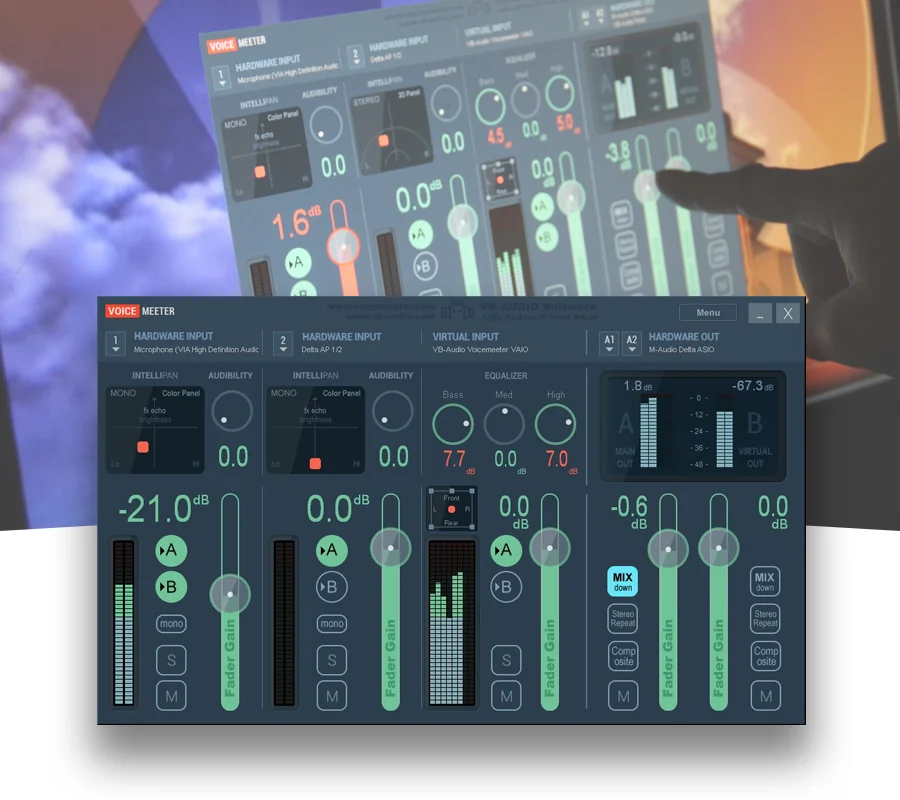
Voicemeeter is VB-Audio's virtual audio mixer, software that sits between a computer's real audio devices and its applications, and the company's own product pages, retrieved 16 September 2026, describe two editions relevant to a VTuber's setup. The standard Voicemeeter page and the Voicemeeter Banana page are both living product documents rather than dated releases, describing the currently shipping software.
What the documents show
The standard edition's page states a layout of three inputs, two physical and one virtual, and three outputs, two physical and one virtual, arranged around two buses labelled A and B, and it describes mixing sources such as microphone, music, video game sound and a voice call together before sending the result to different outputs, a VOIP application, or a recording application. The Banana edition's page states a larger layout, three physical and two virtual inputs feeding five output buses, A1 through A3 and B1 and B2, described as a way to connect and mix any audio sources with any audio applications and route each combination to a different bus. Banana's page also lists processing built into those buses, including a parametric EQ and a strip limiter, applied per bus rather than globally across the whole mixer.
The craft
The documented bus structure is what lets a performer build two different mixes from the same sources: a monitor bus that includes their own microphone for self-monitoring, and a separate stream bus that may exclude a voice changer's dry input or carry a different balance of game and music audio than the performer personally wants to hear. Because each bus can carry its own processing, a creator can apply the Banana edition's documented limiter to only the outgoing stream bus without touching what reaches their own headphones.
Keeping the creator in control
Routing decisions made in Voicemeeter happen before any capture software sees the audio, so a creator who understands the documented bus layout controls what leaves their machine independently of what they personally hear, which matters if a co-host, a voice changer or background music needs to reach one destination but not another. This is an editorial point: treating bus assignment as a deliberate routing decision, checked against the documented input and output count for a given edition, avoids the common mistake of accidentally streaming a monitor-only source.
- Which bus does your microphone actually feed, and is that the one your stream software captures?
- Are you using per-bus processing, or applying the same settings to your monitor and stream mix?
- Does your edition's documented input count match how many sources you are actually routing?
A mixer this flexible only helps once its documented bus layout is understood; otherwise it is just as easy to route the wrong mix to a stream as the right one.
Sources & reading trail
States the standard edition's 3-input/3-output, 2-bus layout and its use for mixing voice with other sources before sending the result to a separate output.
Source published: Not established · Retrieved: 16 September 2026
States Banana's 3 physical/2 virtual input and 5-bus (A1-A3, B1-B2) output layout and its per-bus EQ and limiter processing.
Source published: Not established · Retrieved: 16 September 2026
Documentation, agency filings and platform records establish the entry; the craft reading is VTubing editorial analysis. This retrospective draft does not imply the site published on the event date.