The setup
Streamlabs Desktop and the Streamlabs dashboard drive the alert boxes, chat boxes and donation overlays many streamers run as OBS or Streamlabs Desktop browser sources. The company's own help articles, Setting up Your Streamlabs Alerts and Alerts/Widget Troubleshooting, describe how those overlays connect to a creator's account and what happens when that connection needs to be protected. As retrieved on 16 September 2026, both pages describe the current version of the dashboard.
What the documents show
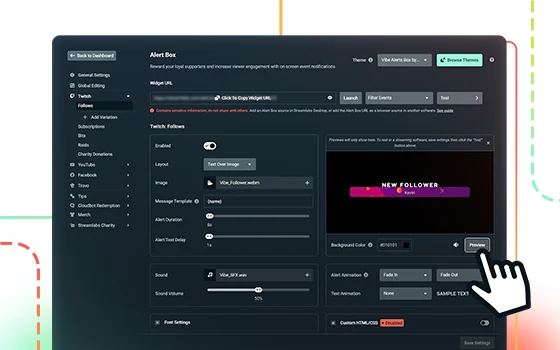
The setup guide describes the Widget URL as a unique web link that a creator copies into a browser source, and it is this single link, not a login, that authorises an overlay to display that creator's alerts. The troubleshooting article documents what happens if that link needs to be revoked: resetting the account's API Token immediately breaks every existing Widget URL, requiring the creator to update every browser source in every piece of software where it was pasted. Read together, the two pages describe a credential-style link rather than a public embed code, since the reset procedure only makes sense if possessing the link is equivalent to having access. Separately, the setup guide documents an event-filtering option scoped per Widget URL, letting a creator expose only chosen alert types, such as follows, to whichever overlay uses that particular link, and the troubleshooting guide documents an Alert Moderation Delay arrangement in which a moderator must accept an incoming alert before it plays on stream.
The craft
In practice, this gives a performer two documented levers for what reaches the overlay a viewer sees. Filtering a Widget URL to specific event types keeps an overlay used for one purpose, say, a subscriber-only alert feed, from also carrying donation messages a creator has not previewed. The moderation-delay arrangement inserts a person, the creator or a trusted moderator, between an incoming alert and its appearance on screen, the documented mechanism for catching a problem before an audience sees it rather than after.
Keeping the creator in control
Treating the Widget URL as sensitive, not sharing it, screenshotting it, or pasting it somewhere public, follows from Streamlabs' own reset procedure existing at all: a link that cannot be revoked without breaking every source using it is, on that evidence, meant to be controlled tightly. This is an editorial extension of what the documents state: pairing a private Widget URL with the moderation-delay option reduces the chance that a stranger's message, rather than the platform, becomes the route through which something unwanted ends up on a performer's overlay.
- Has the Widget URL for each overlay ever been pasted somewhere outside the streaming software itself, such as a public chat or document?
- Is event filtering configured so each overlay only carries the alert types it actually needs?
- Would enabling Alert Moderation Delay, even for a subset of alerts, catch a problem before it airs rather than after?
Streamlabs frames these as configuration options rather than as a dedicated safety guide, but read together they document a real, specific practice for keeping an overlay from becoming an unscreened channel onto a creator's stream.
Sources & reading trail
Describes the Widget URL as the unique link authorising a browser-source overlay, and documents per-link event filtering.
Source published: Not established · Retrieved: 16 September 2026
Documents that resetting the API Token invalidates every existing Widget URL, and describes the Alert Moderation Delay feature requiring a moderator to accept an alert before it plays.
Source published: Not established · Retrieved: 16 September 2026
Documentation, agency filings and platform records establish the entry; the craft reading is VTubing editorial analysis. This retrospective draft does not imply the site published on the event date.